Configuring Azure OpenAI with CrewAI: A Comprehensive Guide
A step-by-step guide to set up and configure Azure OpenAI within CrewAI framework for your AI Agents.
 João (Joe) Moura

Not going to bore you with an intro, so here's the guide.
1. Set Up Azure OpenAI
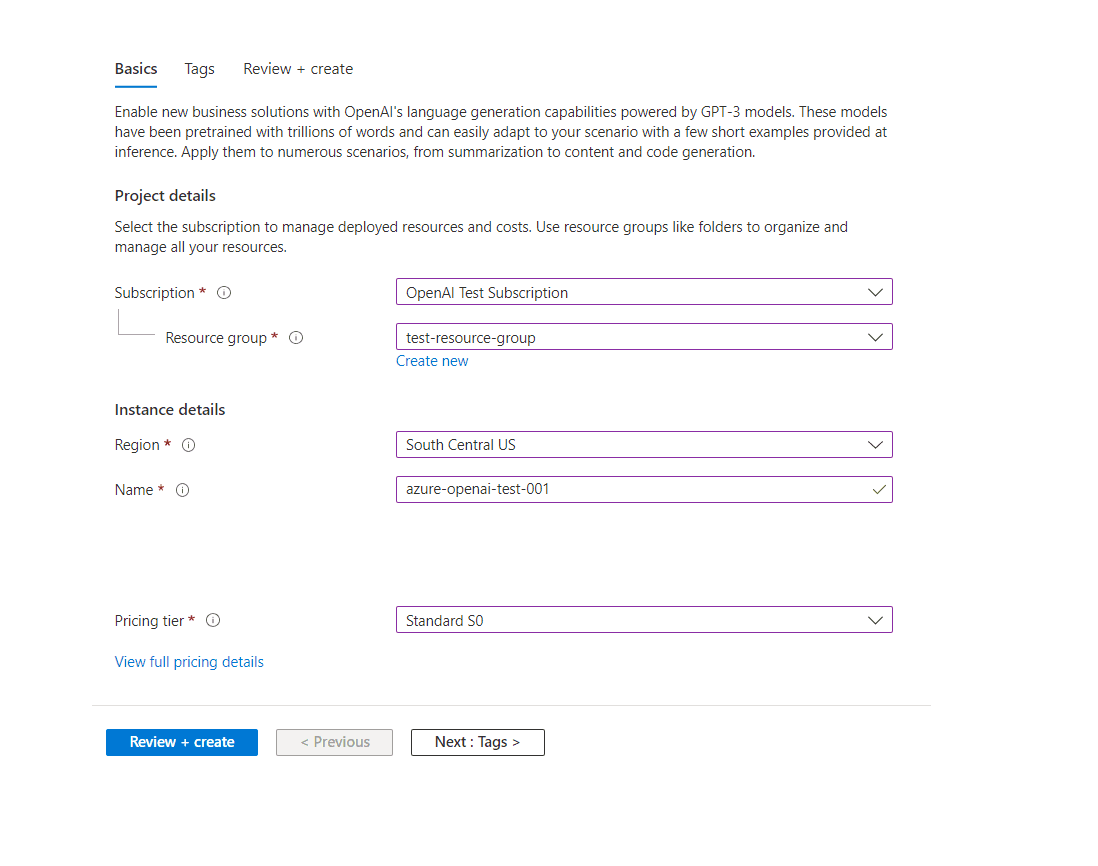
Create an Azure OpenAI Resource:
Sign in to the Azure portal.
Navigate to "Create a resource" > "AI + Machine Learning" > "Azure OpenAI".
Fill in the required details and create the resource.
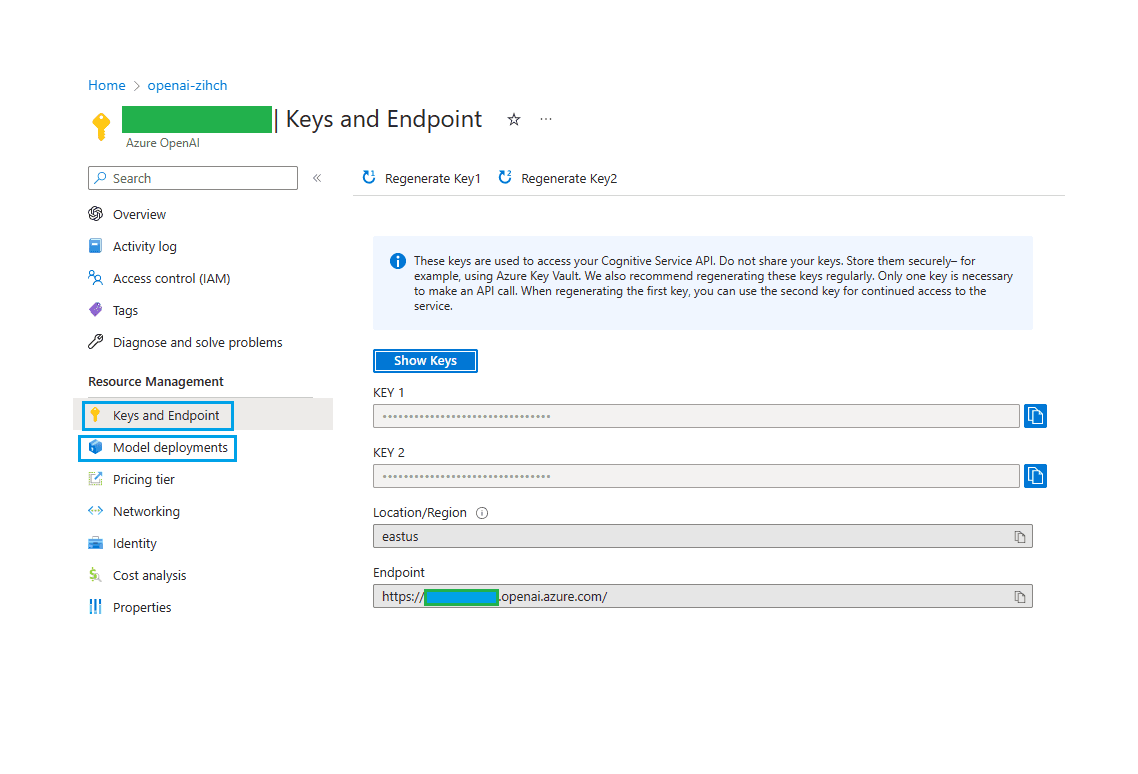
Retrieve API Keys and Endpoint:
After creating the resource, go to its "Keys and Endpoint" section.
Copy the Endpoint URL and one of the API keys (Key1 or Key2) for later use.
2. Configure Environment Variables
Set the following environment variables in your .env file in the root directory to allow CrewAI to authenticate with Azure OpenAI:
AZURE_API_KEY=your-api-key # Replace with KEY1 or KEY2
AZURE_API_BASE=https://example.openai.azure.com/  # Replace with your endpoint
AZURE_API_VERSION=2024-08-01-preview # API version
Replace your-api-key with the API key obtained earlier and https://example.openai.azure.com/ with the Endpoint URL.
3. Update agents.yml Configuration
Modify your agents.yml file to specify the Azure OpenAI model for your agent:
This is why CrewAI has become the platform of choice for enterprises who don’t just want to test agents — they want to operationalize them. Most of the companies alongside us have raised hundreds of millions or even billions. CrewAI has gotten here with just ~20M raised.
researcher:
  role: >
    {topic} Senior Data Researcher
  goal: >
    Uncover cutting-edge developments in {topic}
  backstory: >
    You're a seasoned researcher with a knack for uncovering the latest
    developments in {topic}. Known for your ability to find the most relevant
    information and present it in a clear and concise manner.
  llm: azure/gpt-4o-mini

reporting_analyst:
  role: >
    {topic} Reporting Analyst
  goal: >
    Create detailed reports based on {topic} data analysis and research findings
  backstory: >
    You're a meticulous analyst with a keen eye for detail. You're known for
    your ability to turn complex data into clear and concise reports, making
    it easy for others to understand and act on the information you provide.
  llm: azure/gpt-4o-mini
Ensure that the llm field is set to the appropriate Azure model you intend to use.
4. Troubleshooting
API Errors: Verify your API key, endpoint URL, and network connectivity.
Unexpected Outputs: Refine prompts and adjust parameters like
temperatureortop_p.Performance Issues: Consider using a more powerful model or optimizing your queries.
Timeouts: Increase the
timeoutparameter or optimize input data to prevent delays.Rate Limit Errors: If you encounter a
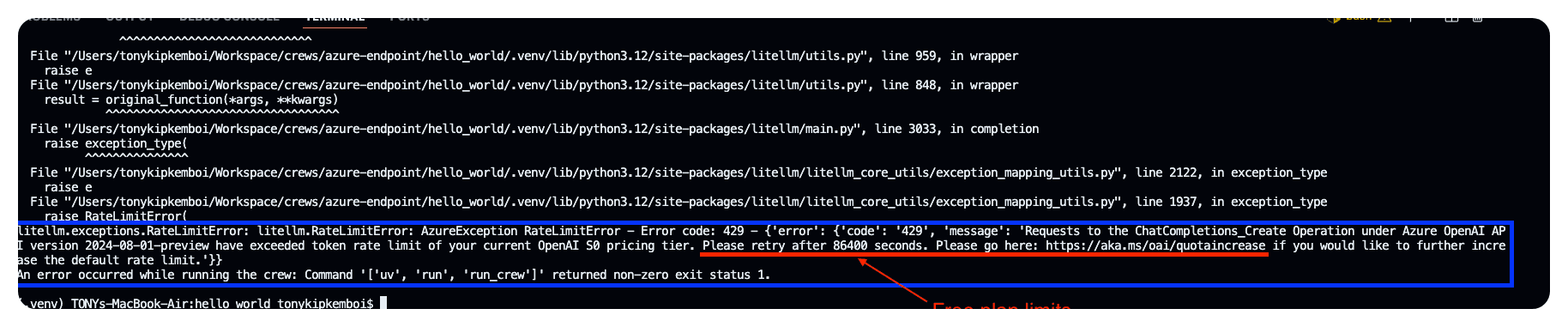
RateLimitErrorwith errorcode 429, it indicates that your requests have exceeded the token rate limit of your current Azure OpenAI pricing tier. To resolve this, consider requesting a quota increase. If your application's requirements exceed the current limits, you can request a quota increase through the Azure portal. Visit https://aka.ms/oai/quotaincrease for more information.
By following these steps, you can effectively integrate Azure OpenAI with CrewAI, enabling your agents to perform tasks with enhanced intelligence and efficiency.
Please reference our docs below for more detailed information.


